IMPLICATOR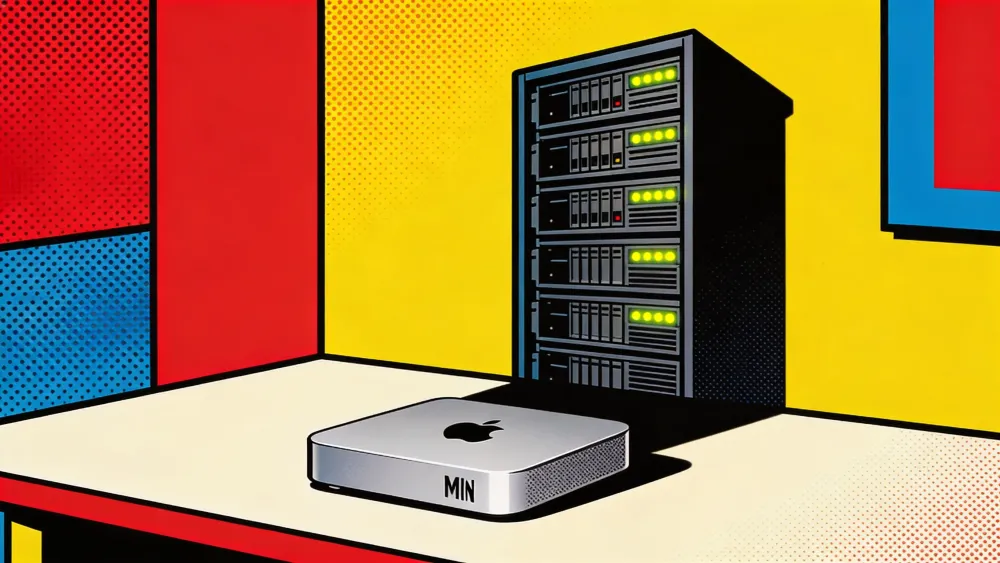
Apple is selling Mac Minis faster than at any point in the product's history. YouTube is flooded with tutorials on turning one into a personal AI lab. The pitch writes itself: $599 for the base model, total data privacy, zero API subscriptions, and a silent box on your desk running local models that never phone home. Buyers are convinced they are getting a cheap AI server. The hardware community is convinced those buyers are delusional.
Both sides are wrong.
The Mac Mini is not an AI server. It was never supposed to be one. What it actually is, what the hardware debate keeps failing to name, is something closer to GarageBand circa 2004. When Apple shipped a recording studio inside every Mac, professional musicians dismissed it. You cannot make a real album in your bedroom, they said. Billie Eilish's Grammy-winning debut, recorded entirely in a Los Angeles bedroom, proved the professionals right about the gap in capability and wrong about what most people actually needed.
The Mac Mini is doing the same thing to AI infrastructure. And neither the boosters nor the skeptics can see it, because both are stuck arguing about the wrong category.
The Breakdown
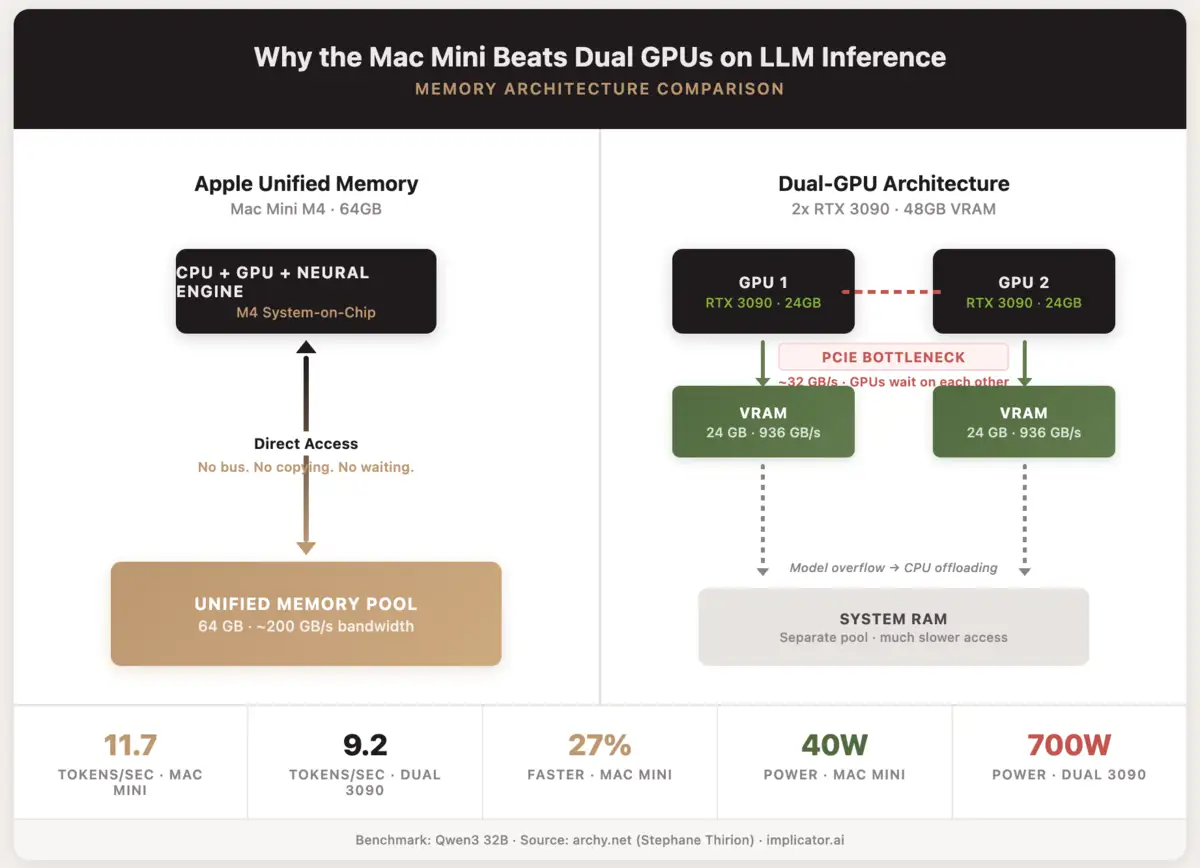
- Mac Mini M4 with 64GB beat dual RTX 3090s by 27% on Qwen3 32B inference while using 22x less power
- LLM inference rewards memory bandwidth over raw compute, giving unified memory an architectural edge for single-user workloads
- The Mac Mini caps out at 13B models on 32GB and cannot serve multiple users, fine-tune, or run batch inference
- The real category is "personal inference appliance," filling the gap between cloud APIs and dedicated GPU hardware
The sales pitch is half right
The privacy argument is legitimate. Data stays on your network. No API calls to OpenAI or Google. For lawyers, doctors, and accountants handling client documents, that protection has real value. A Mac Mini M4 with 32 gigabytes of unified memory runs Google Gemma, Qwen, or Mistral models locally, and the setup takes an afternoon with free tools like LM Studio or Ollama.
But the marketing commits the sin of omission. No tokens-per-second figures in the glowing reviews. No comparison between a local Gemma model and the Claude or GPT systems that the target audience probably already uses. No mention of what happens when you push beyond 13-billion-parameter models on 32 gigabytes of shared memory. The story presents a very specific tool as a general solution, calling it an "AI server" when it functions more like a personal inference appliance.
That framing invited the predictable backlash: the hardware community jumped on every missing data point and declared the entire premise wrong. The backlash overcorrected.
The skeptics are fighting the last war
Critics pointed out every limitation. Unified memory is not VRAM. macOS kills background processes. The Mac Mini cannot handle concurrent users. Docker runs inside a Linux VM on macOS, adding overhead. All of that is accurate. All of it misses the argument.
The skepticism treats the Mac Mini as a failed attempt to build an AI server. It is not one. The question was never whether a $599 aluminum box can replace a rack of RTX 4090s. The question is whether most people who want local AI inference need a rack at all.
They do not.
One independent benchmark makes this concrete. Stephane Thirion sank over a year into a dual RTX 3090 server, 48 gigabytes of VRAM, proper cooling, the works. He ran Qwen3 32B on both that rig and a Mac Mini M4 loaded with 64 gigs of unified memory. The Mini hit 11.7 tokens per second. His dual-GPU tower? 9.2. Twenty-seven percent faster, while pulling 40 watts to the server's 700. Twenty-two times more efficient per token.
The reason is architectural, not magical. LLM inference is memory-bandwidth bound. Model weights move constantly between memory and processing cores. When a model spans two GPUs, those GPUs communicate over PCIe. That bus becomes the bottleneck. Unified memory eliminates it. One pool, no copying, no waiting.
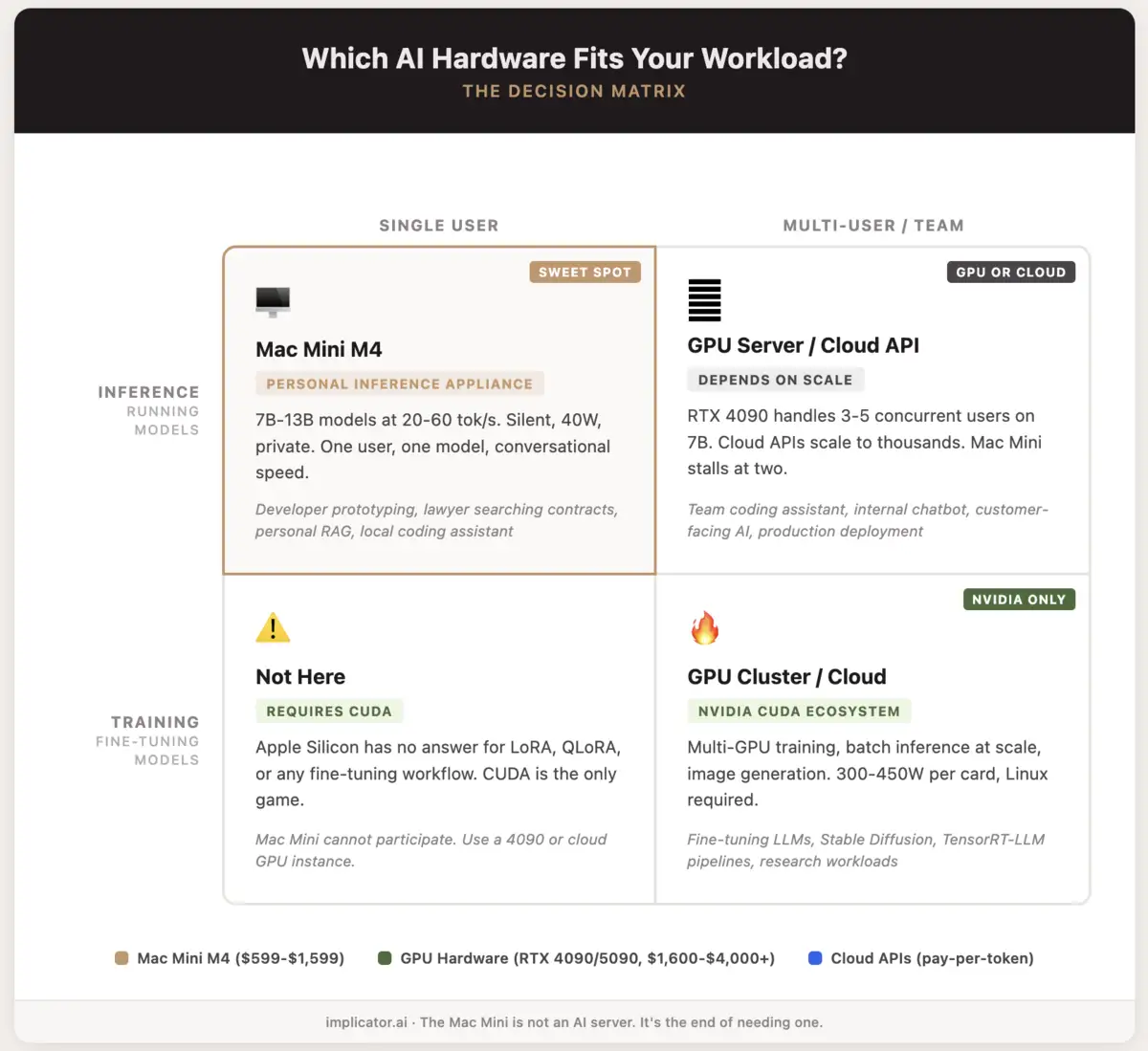
Nvidia still dominates training, batch inference, and image generation. Those are real workloads for real teams. Fine-tuning belongs on CUDA hardware, full stop. But single-user, single-model inference, the thing most people actually do when they "run AI locally," rewards memory bandwidth over raw compute. The Mac Mini delivers exactly that. The skeptics keep grading it on someone else's exam.
What Can You Do With a Mac Mini and AI?
- Chat with 7B-13B models at 20-60 tokens/sec through LM Studio, Ollama, or MLX. Gemma, Qwen 2.5, Mistral, Llama 3, they all fit on 32GB.
- Build a private RAG system over hundreds of documents with AnythingLLM or Open WebUI. Contracts, internal memos, research papers, none of it leaves your network.
- Run a local coding assistant with Qwen Coder or similar. Autocomplete, code review, refactoring. Zero API cost.
- Run an always-on AI agent that sorts your inbox, writes summaries, pulls daily research. Uses about 10-30W at idle, roughly what a desk lamp burns.
- Kick the tires on 30B-70B models (quantized) if you spring for 64GB. You get 5-12 tokens/sec. Enough to test ideas, too slow to ship anything.
- Where it stops: No fine-tuning, no batch jobs. A second concurrent user tanks the whole thing. Models above 100B parameters need dedicated GPU hardware.
The number that matters is not tokens per second
Twenty tokens per second is faster than you can read. That fact keeps getting buried under benchmark tables.
Hardware forums cannot stop talking about throughput. How many tokens per second. How many TFLOPS. How fat is the memory bus. And sure, those numbers carry weight when you are feeding thousands of concurrent requests through a data center rack. They matter far less for one developer querying a local model from a terminal window.
Stay ahead of the curve
Strategic AI news from San Francisco. No hype, no "AI will change everything" throat clearing. Just what moved, who won, and why it matters. Daily at 6am PST.
No spam. Unsubscribe anytime.
What matters for personal use is a different set of questions entirely. Does the model actually fit in memory, or are you quantizing it down to garbage? Can the machine stay on for days without thermal throttling? Is it quiet enough to sit in a room where you work? And can you get it running in an afternoon without spending that afternoon debugging CUDA driver conflicts?
By those measures, the Mac Mini quietly embarrasses hardware that costs three to ten times more. Take Nvidia's DGX Spark. It shipped last October at $3,999 with 128 gigabytes of unified memory. Double what a maxed-out Mac Mini carries. But early benchmarks showed just 2.7 tokens per second on Llama 70B. Prototype speed, not production speed. The Spark fills a prosumer gap. The Mac Mini sits below it, serving a different need entirely, at one quarter the price.
Vadim Nahornyi, an AI infrastructure architect, described the split clearly: when designing local AI for a business, you balance two contours. A quality contour, meaning which model fits and at what quantization level. And a speed contour, meaning how many tokens per second and how many concurrent users. The Mac Mini wins the quality contour because the model actually fits in memory. Nvidia wins on speed. For most personal and small-team use cases, quality matters more. A good answer in two seconds beats a bad answer in one.
What the boosters refuse to admit
The Mac Mini has real limits. Pretending otherwise poisons the conversation.
You cannot run frontier-class models on it. On 32 gigabytes, the best open-source models you can run comfortably cap out around 13 billion parameters. They handle routine work fine. Summarization, document search, code completion. For complex reasoning, multi-step analysis, or anything requiring the latest training data, they fall visibly short of what Claude or GPT deliver.
You cannot serve multiple users. A Mac Mini running a seven-billion-parameter model handles one person's queries smoothly. Add a second concurrent user and performance degrades. Add five and the machine stalls. That is not a server. That is a personal tool.
And macOS is not a server operating system. Apple's energy management actively fights sustained workloads. Background processes get throttled when the display sleeps. Docker on macOS runs inside a Linux virtual machine, adding latency and memory overhead. Building production AI infrastructure on macOS means fighting the platform at every turn.
The boosters get defensive when these limits surface, as if acknowledging constraints invalidates the product. It does not. It clarifies the product. A GarageBand album can win a Grammy. It still cannot replace Abbey Road for a full orchestra.
What Can You Do With an RTX 4090 or 5090 and AI?
- Tear through 7B-13B models at 80-150+ tokens/sec. A 5090 with its 32GB of VRAM and 1.8 TB/s bus makes small models feel instant. The 4090 is not far behind, 24GB at 1 TB/s.
- Serve a small team from a single card. Three to five people can hit a 7B model simultaneously on a 4090 and nobody waits.
- Train and fine-tune with LoRA, QLoRA, the whole CUDA toolchain plus PyTorch. Apple has nothing to offer here.
- Generate images locally with Stable Diffusion, FLUX, or ComfyUI. The 4090 remains the default card for AI image work, and it earns that spot.
- Run batch inference pipelines for data extraction, classification, document processing at volume. TensorRT-LLM wrings every token out of Nvidia silicon.
- Push into 30B-70B territory with quantization on the 5090's 32GB VRAM, or split across two 4090s (48GB combined, PCIe bandwidth penalty included).
- The trade-offs: Loud, 300-450W under load, fans you hear down the hall. Power efficiency is not part of the pitch. Models bigger than VRAM get shoved to CPU and crawl. Run Linux for the best results. Windows costs you meaningful speed.
The debate both sides keep losing
The real problem is vocabulary. The industry has two labels: "cloud AI" and "AI server." The Mac Mini fits neither.
Cloud AI means API calls to hosted models. Fast and capable, sure, but expensive over time and privacy-hostile by design. Every prompt leaves your network. An AI server means rack-mounted or workstation-class GPU hardware, built for throughput and multi-user access. Expensive upfront. Powerful. A pain to maintain.
Call the Mac Mini what it actually is: a personal inference appliance. Silent. Private. Good enough for one person's daily AI work, cheap enough to treat as disposable infrastructure. Seven-billion to 13-billion-parameter models run at conversational speed. Local RAG over a few hundred documents works without drama. And every byte of your data stays on your own network, which is half the reason people buy one in the first place.
Professional studios did not close when GarageBand shipped. The market split. Professionals kept their studios. Everyone else stopped needing one. The AI hardware market is splitting the same way. Enterprises and research labs will continue buying GPU servers and renting cloud inference. Home labs are already becoming the default for always-on AI agents, and a silent Mac Mini fits that setup better than any GPU rig.
And the industry feels anxious about this split, partly because the language has not caught up. Hardware reviewers compare the Mac Mini to GPU servers because there is no other frame of reference. Tech publications pit it against Nvidia cards as if the same buyer is considering both. The comparison forces a verdict the device was never designed to receive.
The hardware argument that answers itself
If you run AI for a living, you need GPU hardware or cloud inference. Nothing about the Mac Mini changes that. Training requires CUDA. Batch inference requires throughput. Multi-user deployment requires actual server architecture.
But if you are a developer prototyping locally, a lawyer searching contracts, a small team building a private RAG system, or anyone who wants a local AI that does not phone home, the Mac Mini is not a compromise. It is the tool that matches the job.
The debate about whether it "replaces" an AI server will keep burning through forum threads and YouTube comment sections. Both sides will keep scoring points against arguments the other side never made. Meanwhile, Apple sells another batch of Mac Minis. Most of those buyers will never look up a benchmark. They just want the thing to work, stay quiet, and keep their data in the room.
That was always the point. The industry just has not built a name for it yet.
Frequently Asked Questions
What size models can a Mac Mini M4 actually run?
On 32GB unified memory, models up to 13 billion parameters run at 20-60 tokens per second. The 64GB configuration handles 30B-70B quantized models at 5-12 tokens/sec, good enough for prototyping but too slow for production.
Why does the Mac Mini beat dual RTX 3090s on some benchmarks?
LLM inference is memory-bandwidth bound. When a model spans two GPUs, they communicate over PCIe, creating a bottleneck. Unified memory eliminates that bus entirely. One memory pool, no copying between devices.
What software do you need to run AI models on a Mac Mini?
LM Studio, Ollama, or MLX are the main options, all free. Setup takes an afternoon. Models like Gemma, Qwen 2.5, Mistral, and Llama 3 work out of the box on Apple Silicon.
How does the Mac Mini compare to Nvidia's DGX Spark?
The DGX Spark costs $3,999 and offers 128GB of unified memory, double the Mac Mini's max. But early benchmarks showed just 2.7 tokens per second on Llama 70B. The Spark fills a prosumer gap at four times the price.
Can a Mac Mini replace cloud AI subscriptions entirely?
For routine tasks like summarization, document search, and code completion, yes. For complex reasoning or tasks needing the latest training data, local 13B models fall short of Claude or GPT. Most users will keep both.

Marcus Schuler
Editor-in-Chief and founder of Implicator.ai. Former ARD correspondent and senior broadcast journalist with 10+ years covering tech. Writes daily briefings on policy and market developments. Based in San Francisco. E-mail: editor@implicator.ai